Brokentooth.io / 06 Writing / I Automated My Side of the Glass
I Automated My Side of the Glass
From copy-paste ChatGPT to a shared control bus for every machine I own. The night my AI tools stopped being separate islands.

I didn't build another chatbot. I built a way for the chatbots I already use to reach the machines I already own.
I've spent a lot of time watching the AI gold rush from the driver's seat. Literally. I still drive for a living, about seventy hours a week, and in between that I build software, maintain a small fleet of Linux machines, and pursue an unreasonable number of projects. The AI videos make all of this look effortless: one prompt, one agent, one astonishing result. They tend to cut away before the broken gateway, expired credentials, remote-display nonsense, and six hours of figuring out why it stopped working.
On October 26, something finally clicked. A remote-computer integration hit its quota and took away access to my own equipment. I didn't want another subscription, another workaround inside one particular AI product, or another full-time job babysitting an agent gateway. I wanted the missing piece itself.
So I built my own MCP server. And then I connected it to ChatGPT and made it operate a real machine.
That sentence means almost nothing unless you know how strange the road here has been. Let me rewind.
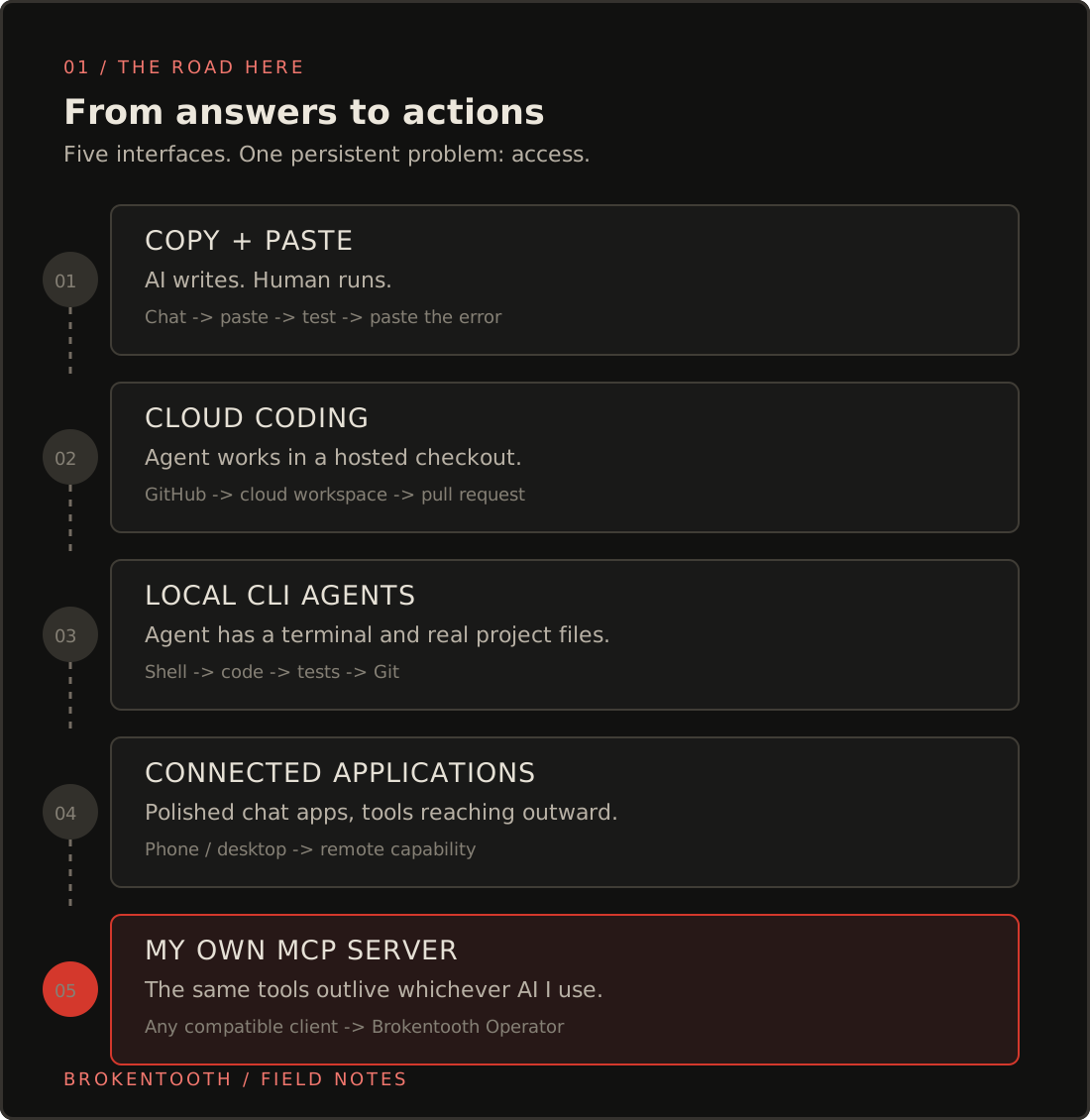
We used to copy and paste intelligence
At first, AI programming was basically a very clever pen pal. You'd ask ChatGPT to write some code. It would produce an answer. You copied it into an editor, tried running it, copied the error back, and repeated. The model understood the conversation; you operated the computer. It could describe a repair without ever touching the broken thing.
Then cloud coding agents arrived. The web-based Codex experience could take a GitHub repository into a hosted workspace, edit code, run tests, and hand back a proposed change. That was a huge step. The AI wasn't just describing work anymore; it was doing some. But its hands mostly lived in its own cloud environment.
Command-line agents changed the geometry again. Claude Code, Codex CLI, and similar tools moved the agent into a terminal connected to an actual working directory. Suddenly it could inspect my source files, run tests, use Git, fix its own mistakes, and repeat. This was the first time the experience felt like development rather than transcription.
The catch? Access lived where the tool ran. Which laptop? Which shell? Which server? Was I inside the right repository? Could that computer reach my Android phone? Did it have a display? Could a cloud agent reach the same files? Switching between assistants often meant switching the entire working environment.
Now there's another turn: excellent AI interfaces in desktop apps and on phones, with powerful models in the cloud and tools that can reach outward to local and remote computers. It feels full-circle: back to an ordinary chat window, except now the conversation can have hands.
An MCP server is a toolbox with a common plug
MCP stands for Model Context Protocol. It isn't an AI model. It's a standard way for an AI application to discover tools, learn what arguments they accept, call them, and receive results.
Think of a universal socket for capabilities. One tool can check whether a computer is alive. Another can list files. Another can operate a browser. Another can talk to Android. A compatible AI client asks my server what it offers, then calls the appropriate tools.
A plugin is how an application such as ChatGPT packages or exposes that connection to me. The MCP server is the actual service providing the tools. And the model is what interprets my request and decides which tool to use. Three different jobs.
I called mine Brokentooth Operator. It sits between the AI applications I like using and the equipment I'm responsible for. It doesn't try to replace ChatGPT or Claude. It gives them something useful to operate.
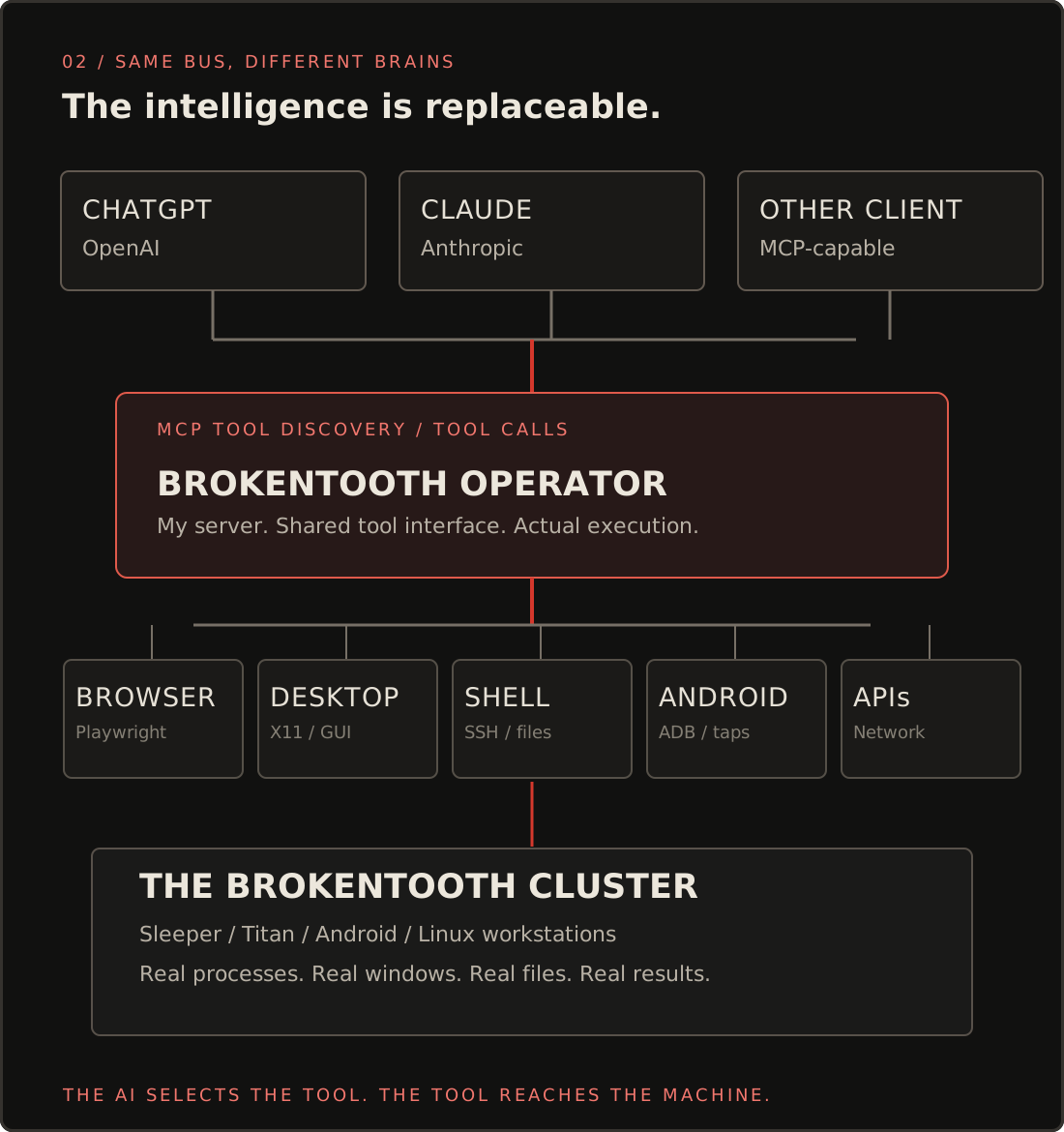
This is the architectural distinction that matters to me. I already have Hermes, with Kanban boards, worker profiles, dispatch, and longer-running jobs. Hermes is my coordination room. It answers questions like which worker owns this task, what is blocked, and what happens next?
Brokentooth Operator is not another coordination room. It's the door to the equipment. It answers what tools exist, which computer can run this operation, and what happened when it ran?
I can use either independently. I can talk to ChatGPT through its app. I can use Claude through a compatible connection. A future MCP-capable client can attach to the same tool service. The intelligent interface is no longer the place where all my computer access has to live.
Not every problem wants a mouse
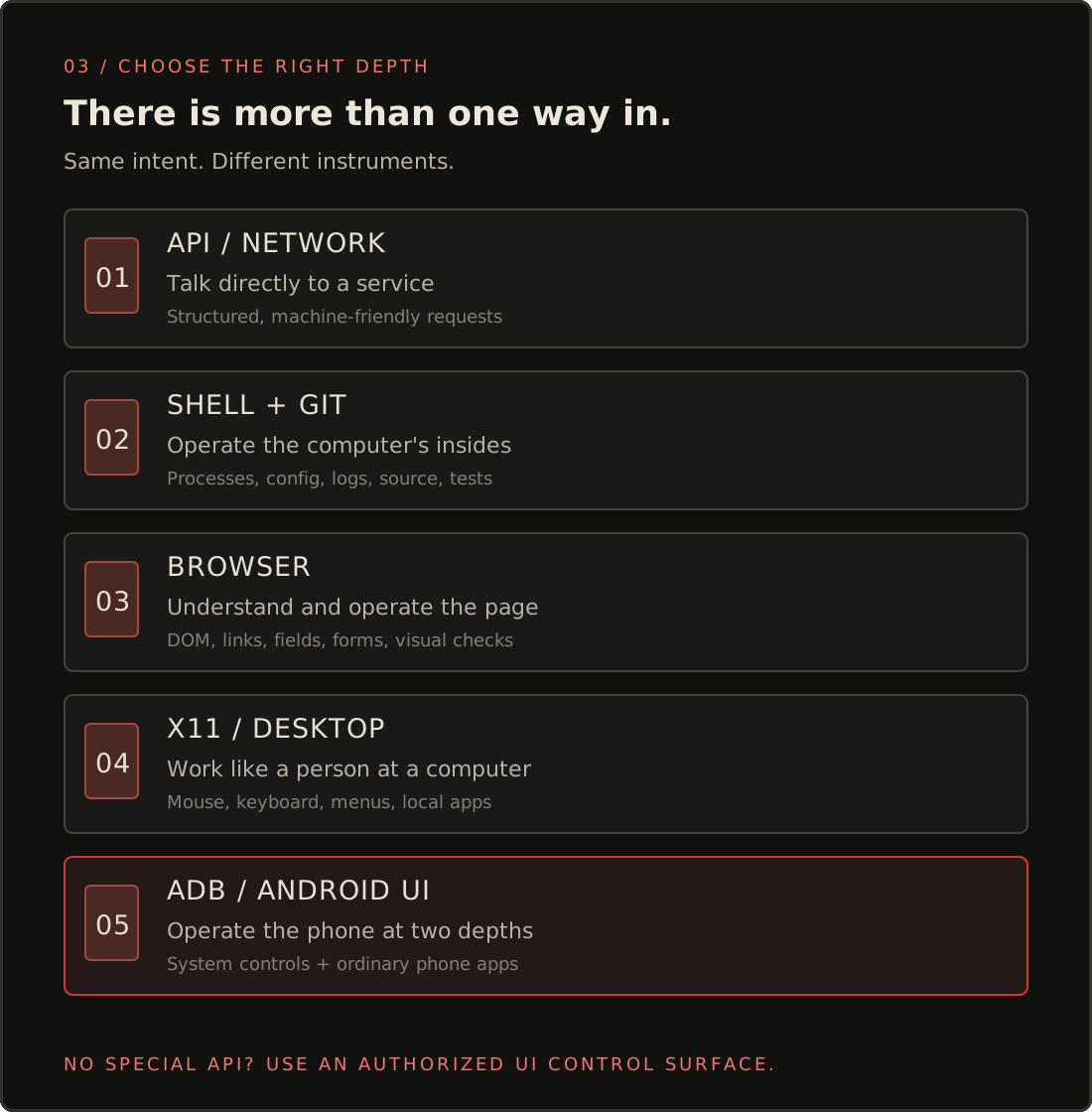
Here's what makes this bigger than remote desktop. A computer has more than one control surface. The best one depends on the job.
These aren't seven competing mouse replacements. They're seven ways of reaching the same outcome at different depths.
If I need the CPU load from Titan, give me a shell command. If a website exposes reliable DOM elements, use browser automation. If an app only exposes a visual interface, use the screen. If Android has a direct setting for something, ADB can be the cleaner route. If I'm developing software, use files, tests, and Git.
The AI can pick among them. I don't have to recite the exact command sequence before I'm allowed to ask for the result.
The weird UI is not the end of the road
Here's my favorite implication, and it's almost comically mundane.
My work involves a driver app full of inspection and fleet-management forms. I'm talking about page after page of boxes, controls, little menus, and confirmations. A pre-trip or post-trip involves an actual physical inspection, of course. But recording the observations can be an awful lot of tapping.
The software vendor does not need to offer an MCP server. It doesn't even need a public API for those forms.
If I can operate the app on my own Android device, I can give an AI a way to operate its interface too. It can inspect what is on screen, navigate between controls, enter the information I give it, and bring the finished report back for my review. The physical inspection and truthful sign-off still come from me; the repetitive interface work doesn't have to.
That's the key. I don't need the fleet software to be designed for my automation. My phone is mine. I can automate the phone's legitimate interactions with the app.
And this isn't limited to phones.
Imagine I'm using ChatGPT and I want another AI's web interface to do something specific. I can have browser automation open that page, enter an instruction, click through the UI, inspect its answer, and continue. It's an AI using a browser to operate another AI's interface, much the way a person would. Whether that makes sense for a particular service depends on its rules and what the interface allows, but technically the control surface is there.
That's a wildly different level of freedom from waiting for every application on Earth to offer a perfect native integration.
I don't need to wait for every software company to build an automation integration for me. I've automated my side of the glass.
One sentence can cross five systems
Let's use a real-world kind of job.
Suppose I find a promising free AI inference provider. I want to use its model through one of my existing agent harnesses. Historically, that means opening its site, reading the docs, dealing with signup, generating a credential, locating the right server, finding the right configuration file, updating it, and testing a request. Then documenting the whole thing so I don't have to rediscover it next week.
Now I can state the outcome instead:
“Check whether this free inference provider is useful. If it is, help me sign up, store the key securely on the right machine, configure the harness I use, and prove the connection with a test request.”
The browser handles the site. If a login or verification needs me, I complete it. The filesystem tools put the credential in an existing protected secret location. The shell can enforce restrictive file permissions. A configuration tool or editor points the selected harness at the provider. Then the AI sends a real inference request and checks the response.
One request. Browser, credentials, remote computer, application configuration, verification. Different tools and different layers, coordinated from one conversation. That's what orchestration looks like when it becomes practical.
Or I could say, “My phone keeps falling asleep; check its display settings.” ADB may be the right instrument. Or, “Open the website and show me why that effect looks wrong.” Now it's browser, inspection, code, maybe a test build. Or, “Is Sleeper okay?” Now it's a remote status tool.
The point is not that every instruction has the same method. The point is that I shouldn't have to care which method it needs before I can ask.
Proof, not a concept drawing
The first connection test wasn't cinematic. It was better: boring and real.
From ChatGPT, through my own Brokentooth connection, I invoked a tool on Sleeper and got an actual remote execution result. Another test discovered desktop capabilities and reported an actual 1440 × 900 Linux display. We went further: launched Kate, opened a document, typed a test string, inspected the application, and checked an undo operation.
BROKENTOOTH_OPERATOR_GUI_TESTTyped into Kate through ChatGPT → Brokentooth Operator → Linux desktop tools. Not a screenshot mockup. Not a copied answer.That's the little miracle hiding behind all these diagrams: an ordinary conversation was able to reach out, find a tool, make an actual graphical application do something, and get the result back.
It happened while I was working as a driver. The interface I needed was the phone already in my hand, not a specially prepared terminal with seventeen tabs open.
And the tool existed because the previous paid remote-access integration had exhausted its quota. The thing that forced my hand ended up producing the better architecture.
Why this isn't just another agent demo
There's a whole world of AI demos that show a bot performing something impressive in one take. OpenClaw helped make always-on personal agents feel tangible. There's real engineering in that ecosystem, and people have built serious things with it.
But installing an agent gateway and getting one lucky result is not the same as building an environment you can keep operating.
I've lived the less photogenic part: Linux services, remote connectivity, permissions, Git, broken dependencies, agent profiles, debugging, deployments, update drift, and knowing what actually ran versus what a model merely claimed to have done.
I tried the always-on-agent path. I still have Hermes because its Kanban dispatch is useful to me. But I've come to enjoy the desktop and mobile AI applications themselves. They provide a polished place to talk and reason. I don't need to recreate that part just to get access to my machines.
That's my version of the AI hype dream: not one super-agent that owns everything, but a set of dependable tools that the intelligence I choose can use.
If I prefer ChatGPT today and Claude tomorrow, I don't throw out the machinery underneath. That's the beauty of a protocol rather than a proprietary one-off integration.
The moment the pieces became a system
None of these parts is individually magical. SSH is old. Git is old. Browser automation isn't new. ADB has existed for ages. Linux graphical automation predates the current AI boom.
What changed is the coordinator. A capable language model can interpret a request, select among these established control surfaces, examine their results, and carry a task from one environment to another.
And what changed for me is that I finally built the common doorway.
Months of configuring machines, chasing authentication bugs, learning software development, and enduring the dull work of maintaining systems suddenly converged on one working path.
I still drive long weeks. I'm still learning this field from the ground up. The projects are still gloriously messy.
But I can sit in an ordinary chat, describe an outcome, and have the assistant reach beyond the conversation into my actual computing environment.
I didn't teach a chatbot a new party trick. I gave my tools a shared set of hands.
And for once, all the work that got me here feels like it's paying dividends.
Built across the Brokentooth cluster. Useful related reading: Hermes Kanban Dispatch, The Cluster Nobody Asked For, and the Model Context Protocol.